Tinder Gold promo code — 1 month
A one-month Tinder Gold promo code with automatic delivery: more likes, swipe rewind, Passport mode and ad-free browsing. You activate it yourself on your own account.
Bazelio is a storefront-aggregator. Payment, delivery, refunds and support depend on the seller and the payment platform. Check the terms of the specific offer before buying.
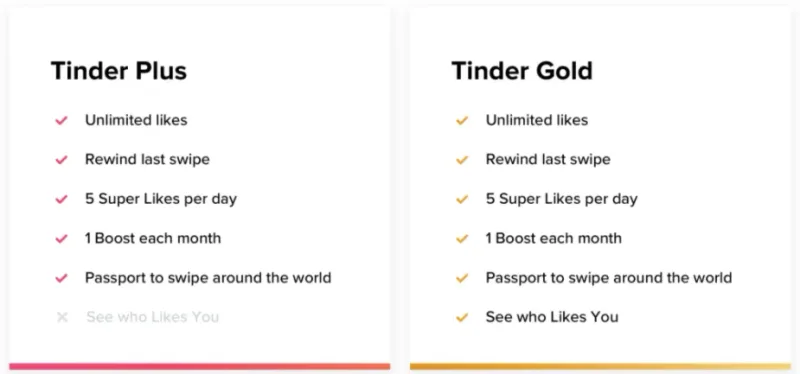
Tinder Gold unlocks the dating app's advanced features for one month: a higher likes allowance, the Rewind swipe-back tool, Passport mode to change your city, extra Super Likes and ad-free browsing. The format is a promo code with automatic delivery: after payment you receive a code and activate the subscription yourself on your own account through the website's browser version.
What you get
- A one-month Tinder Gold promo code delivered automatically right after payment.
- Advanced features: more likes, swipe rewind, Passport mode, Super Likes and ad-free browsing.
- Activation on your own account — you never hand over your account credentials.
- A warranty and seller support on the seller's terms.
Important conditions
- The code's activation region is Europe; you do not need to change your device location to activate it.
- The account must have no active Tinder subscription at the moment you redeem the code.
- The Tinder account must be more than 2 days old; the code is entered in the website's browser version, not the app.
- The code comes from a third-party seller; once delivered and redeemed, refunds are not offered.
Before you pay, check
- That the account has no active Tinder subscription and is more than 2 days old.
- That you are ready to redeem the code through the website's browser version.
- The seller's description, guide and terms on the payment page.
Reviews 100+
100%
positive ratings
- 259 Positive
- 0 Negative
- 259 reviews
-
Спасибо, все отлично
-
good
-
good
-
good
-
good
-
good
-
good
-
good
No reviews yet
Frequently asked questions
How do I use the code or top-up?
The code is entered in the service wallet or account — instructions are on the card. For ID top-ups the required details are also stated on the product card.
Do the region and denomination matter?
Yes, cards and top-ups are usually region-bound and the denomination is fixed. Verify the region and amount before paying — they can’t be changed afterwards.
When will the code arrive?
Items marked “Instant” deliver the code right after payment by the seller on the payment platform.
Guides
Product guides
Related products




Recently viewed
Your purchase opened in a new tab
Subscribe to the channel — deals and new keys so you don't overpay next time.