Productivity
Notion Plus, Business and Notion AI: which plan you need and how it's bought
How Notion Plus differs from Business, what the Notion AI add-on does and in what format these subscriptions are sold on a marketplace.
Notion is a connected workspace: notes, databases, documents and team collaboration live in one place. The free plan is fine for personal notes, but page history, guests and team features run into the paid plans, while Notion AI is sold as a separate add-on. Let’s break down how the plans differ and in what form marketplaces sell them.
Plus, Business and the AI add-on
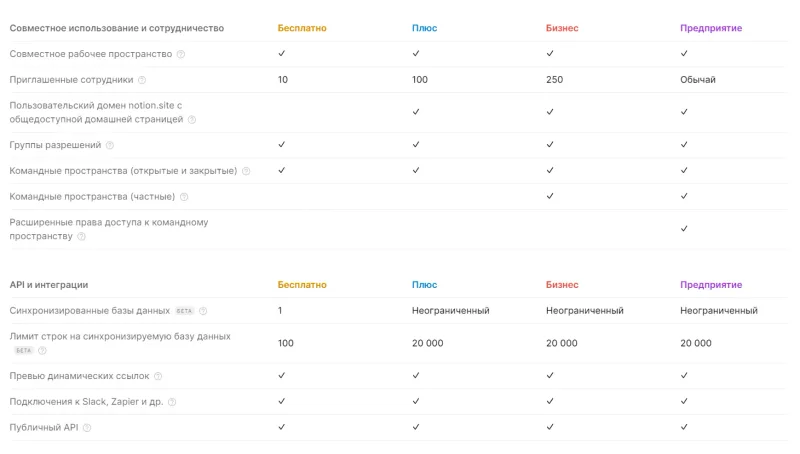
Plus is the base paid plan: per the listing, it gives 30-day page history, up to 100 invited guests, synced databases, integrations and the public API. It’s usually enough for personal work and small teams.
Business is everything in Plus, plus 90-day history, private team spaces, PDF export and SAML SSO sign-in. Companies pick this plan when access control and corporate sign-in matter.
Notion AI is an add-on to a plan, not a standalone service: text generation and editing, document summaries, help with tables and databases. If what you actually need is an AI assistant as a tool of its own, see our ChatGPT Plus guide.
What the catalog offers
Notion Plus / Business — monthly or yearly subscription — the seller sets up the chosen plan on your own workspace for 1 month or 1 year. Key details from the listing:
- the price covers 1 workspace member, not the whole team;
- after payment you send the seller a 16-digit code plus your login and password — change the password once the service is done;
- the Notion AI add-on can be included for an extra fee at checkout.
Notion AI — Plus, Business or Enterprise — a Notion subscription with the AI features included, for 1 month. From the listing:
- it is set up on your existing account or a new one — registered on your email or delivered together with a mailbox;
- processing takes 15 minutes to 3 hours (up to 24 hours in rare cases), daily from 11:00 to 00:00 Moscow time;
- all plans are issued for a 1-month term.
Notion AI / Plus / Business / Enterprise — 1 or 12 months — another activation service for your own account, but with a wider choice: AI, Plus, Business or Enterprise plans for 1 month or 1 year. From the listing:
- manual activation: after payment send the seller a unique code plus your Notion login and password — change the password after activation;
- the account must use email-and-password login, not Google sign-in;
- all four plans — from AI to Enterprise — are available for 1 month or 1 year.
All three offers use the “activation on your account” format: you stay in your own workspace with your pages and settings. How this format differs from shared accounts and keys is covered in “Shared account, personal account or key”.
All the listings also carry a neutral warning: the service may be unavailable in some regions — check availability in advance.
What to check before paying
- The plan and term. Plus or Business, month or year; in the Notion AI offer every plan is strictly 1 month.
- The number of members. The price is per workspace member — a team costs more than the listed figure suggests.
- The handover flow. What the seller needs (code, login, password) and how long the order takes; change the password once it’s done.
- Regional availability of the service on your side.
- The warranty terms and reviews on the seller’s page.
Bazelio is a storefront: payment is taken by the seller on the payment platform, and the seller handles the subscription setup and support. Nearby in the catalog are other work tools: JetBrains development environments and Grammarly for checking English text, with the whole section in the Subscriptions category.