Games
Mobile Legends diamonds: top-up by ID, passes and the double bonus
How to top up Mobile Legends diamonds by User ID and Zone ID without a login, what the Diamond Pass and double-diamonds promo are, and what to check first.
On this page
Mobile Legends: Bang Bang (MLBB) is a popular mobile MOBA with five-on-five matches. Diamonds are its premium currency: they buy heroes, skins and passes. Demand for diamonds rises noticeably around new skins and seasonal events, so it helps to understand how the available top-up formats differ.
Top-up by ID — no login or password
The key trait of all these products: diamonds are credited straight to your account using your User ID and Zone ID, with no login or password to share. Where to find them: your User ID and Zone ID are shown in your player profile inside MLBB (the Zone ID is the number in brackets after the User ID, under Settings).
- Mobile Legends top-up — diamonds and weekly pass — a direct auto top-up by User ID and Zone ID: diamond denominations from 50 to 5000 (with bonus) and a weekly pass, delivered automatically 24/7, Russia region.
- Mobile Legends diamonds and pass — your chosen amount of diamonds or a Diamond Pass, credited automatically right after payment, with support for the Russia, Ukr. UA, Kazakhstan and Belarus regions.
- Mobile Legends — diamonds and passes by UID — a top-up of diamonds and the Diamond Pass to an existing account by UID and Zone ID; this is a top-up by ID, not a code delivery.
Diamond Pass and double diamonds
Beyond a plain top-up there are two useful formats:
- Diamond Pass — grants diamonds on better terms than a one-off top-up; included in the cards above.
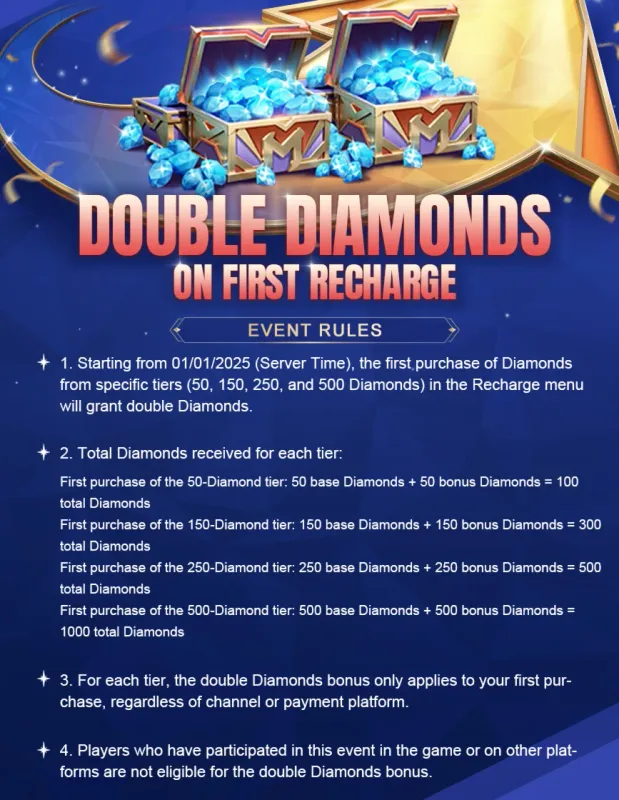
- Double diamonds — a promo bonus on the first top-up of a given denomination: Mobile Legends — double diamonds by ID. Crediting is also by game ID, with no account login.
What to check before paying
- Correct User ID and Zone ID — an error in the ID means diamonds land on the wrong account.
- Account region — Russia, Ukr. UA, Kazakhstan and Belarus are supported.
- Format: one-off diamonds, a Diamond Pass, or the double-diamonds promo.
- Buyer reviews on the card — real-world crediting speed.
Bazelio is a storefront: payment is taken by the seller on the payment platform, and the seller handles delivery and support. For refund questions, see Refunds and disputes. Other top-ups live in the Game currency category, and PC gaming products in the PC games category.